Many users find their 4G LTE smartphones sluggish at times. This experience can be frustrating, especially when browsing or streaming. Expert Dr. Emily Chen, a telecommunications analyst, emphasizes, "There are various factors that affect your smartphone's network speed." Understanding these factors is crucial for improvement.
When asking, "How can I improve the network speed of my 4G LTE smartphone?", one must consider network congestion. This often happens during peak hours. Additionally, the distance from the cell tower plays a significant role. Being in a building with thick walls can worsen the issue.
Moreover, outdated device software can hinder performance. Regular updates help ensure better compatibility with network enhancements. Another aspect to reflect on is the number of apps running in the background. Clearing unnecessary apps can lead to noticeable improvements. Realizing these elements can empower users to address their concerns effectively.
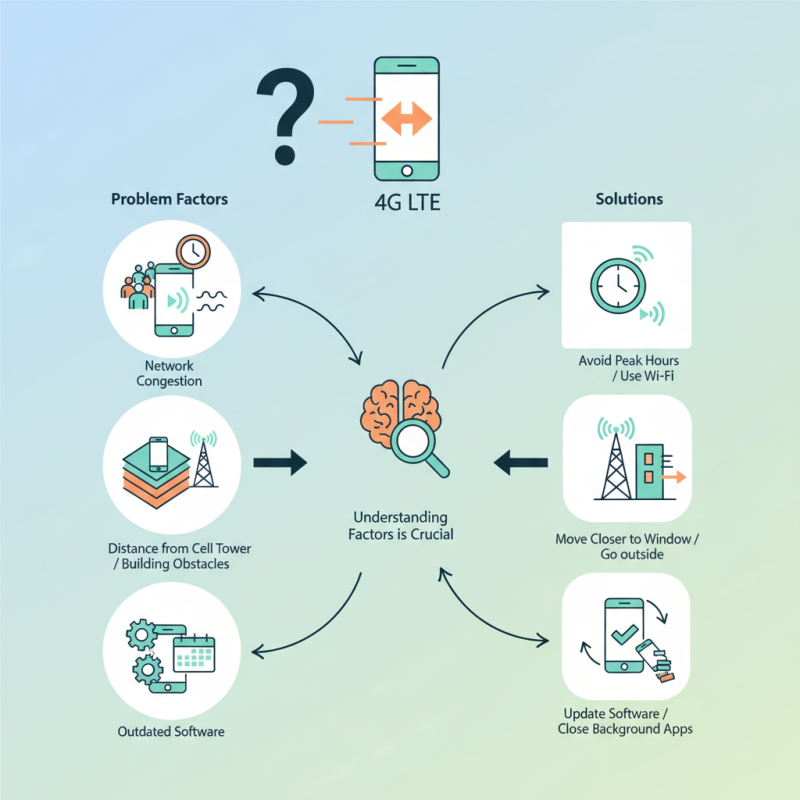
Understanding the Factors That Affect 4G LTE Smartphone Speed
When we talk about 4G LTE smartphone speed, several factors come into play. One major aspect is network congestion. During peak usage times, speeds can drop significantly. According to a report from OpenSignal, average LTE download speeds can decline by as much as 40% in crowded areas. Simply put, too many users on the same network can lead to frustratingly slow speeds.
Another factor affecting speed is the physical environment. Obstacles like buildings or trees can impede signal strength. A study from RootMetrics revealed that urban areas often have variable speeds due to interference. Even weather conditions can play a role. Heavy rain or strong winds may weaken the signal, leading to slower connectivity than expected.
Users often overlook the impact of software. Outdated apps or operating systems can also slow down performance. Background processes may consume valuable bandwidth, hindering your browsing experience. In fact, a survey by Nielsen found that nearly 60% of users experience delays due to unoptimized settings. It's a tough reality, but it highlights the importance of regular updates and maintenance.
Common Symptoms of a Slow 4G LTE Connection
A slow 4G LTE connection can ruin your day. You might experience frequent buffering.
Websites may take ages to load. Streaming videos often stutter or won't start at all.
These common symptoms can be frustrating, especially when you're trying to stay connected.
Sometimes, your smartphone may display just one bar of signal. You might notice that apps take longer to refresh.
Calls may drop out randomly. All these issues can signal a poor connection.
They can also indicate network congestion in your area. Using your phone in crowded places may worsen the situation.
Check if your data plan has limits. Running out of data can slow speeds significantly.
Sometimes, simply restarting your phone can help. Other times, you may need to adjust settings for optimal performance.
Consider turning off location services when you don’t need them. These little changes could make a big difference.
It’s worth experimenting with different strategies.
Checking Your Network Settings for Optimal Performance
When experiencing slow 4G LTE speeds, one of the first places to check is your network settings. Studies show that improper settings can contribute to significant performance drops. A report from the International Telecommunication Union revealed that up to 30% of users face connectivity issues due to misconfigured settings. This stat highlights the importance of proper configuration for optimal streaming and browsing.
Check your APN (Access Point Name) settings. Incorrect APN settings can lead to slow data speeds or complete disconnection from the network. An improperly set APN can hinder the way your device interacts with the mobile network. Additionally, ensure that your network mode is set to LTE. Otherwise, your device might default to slower connections like 3G. It’s easy to overlook these details, but minor adjustments can lead to noticeable improvements.
Don't forget to update your device software. Older versions may not perform well with newer network technologies. Regular updates help maintain compatibility, which can directly enhance speed and performance. Ignoring updates could mean sacrificing essential security patches, too. These factors combined can contribute to the frustrating experience of slow mobile internet.
4G LTE Smartphone Speed Analysis
This chart represents the average performance metrics for 4G LTE smartphones. Signal strength is indicated in dBm, with lower values indicating better performance. Latency is measured in milliseconds, while download and upload speeds are measured in Mbps. These factors greatly influence the perceived speed and performance of your smartphone.
Troubleshooting Connectivity Issues on Your Smartphone
A slow 4G LTE smartphone can be frustrating. Connectivity issues can stem from various factors. It’s essential to troubleshoot systematically.
Check your signal strength. If you’re in a low-signal area, your connection will slow. Move closer to a window or go outside to see if that helps. Sometimes, just a few feet can make a significant difference.
Try restarting your device. This simple step can clear temporary glitches that affect performance. Make sure your software is updated. Outdated software can lead to compatibility issues and slow speeds.
Tips: Clear cached data regularly. This helps apps run smoother and improves overall speed. Disable unused apps and background processes. They might slow down your connection without you noticing.
Check for data limits. Some plans throttle speed after a certain threshold. Monitor your data usage frequently. If you often hit the limit, consider changing your plan.
Sometimes, the issue might not be on your end. Network congestion can occur during peak hours. You might need to be patient. Reflect on your connectivity habits. It may help you identify areas for improvement.
Tips for Improving Your 4G LTE Speed and Efficiency
Many users experience slow 4G LTE speeds. This can be frustrating, especially when you rely on your smartphone for essential tasks. According to a report from OpenSignal, average 4G LTE download speeds can vary widely based on factors like location and network congestion.
To enhance your 4G LTE speed, consider reducing unnecessary app usage. Background apps can drain bandwidth. Closing these apps can free up valuable resources. You might also want to check your phone settings. Often, switching from automatic network selection to a specific network can improve connectivity.
Network congestion is another common issue. Peak usage times tend to slow speeds significantly. Make it a habit to test your speed during different times of the day. This can give you insights into when your connection is at its best. Remember, location matters too. Being indoors or in a basement may hinder signal strength. Moving to a more open space can drastically improve your experience.
Why is My 4G LTE Smartphone Slow and How Can I Fix It?
| Issue |
Description |
Solution |
| Network Congestion |
High demand on local cell towers can slow down speeds. |
Try using your phone in less crowded areas or during off-peak hours. |
| Outdated Software |
Older versions of the operating system can cause inefficiencies. |
Update your smartphone’s software regularly to improve performance. |
| Weak Signal |
Distance from the cell tower or physical obstructions can weaken the signal. |
Move to an area with better coverage or clear obstructions around you. |
| Background Apps |
Apps running in the background can consume data and slow down the device. |
Close unnecessary apps and limit background data usage. |
| Device Settings |
Improper settings can impact your smartphone's performance. |
Reset network settings to default or check for specific LTE settings. |
Conclusion
In the article "Why is My 4G LTE Smartphone Slow and How Can I Fix It?", various factors affecting the speed of 4G LTE connections are explored. Users may experience slow connectivity due to a number of reasons, including network congestion, poor signal strength, or incorrect settings. Common symptoms point to lagging load times or interrupted streaming, prompting the need for users to assess their network settings for optimal performance.
To tackle slow speeds, the article offers practical troubleshooting tips and strategies to enhance the connectivity of your device. By following guidelines to check network settings and improve overall efficiency, individuals can effectively address the question, "How can I improve the network speed of my 4G LTE smartphone?" With the right adjustments, smartphone users can experience a notable boost in their online activities.

 Elite Smartphone