Travel exposes every weakness in a tablet. A loose charging port, dim screen, or weak battery can become a serious problem at a crowded airport or remote worksite. Travelers need more than a tough shell. They need dependable performance, readable displays, secure connectivity, and manageable weight.
VDC Research’s reports on rugged mobile computing emphasize durability, lifecycle value, and field reliability. These factors matter because business travelers often replace devices less frequently than ordinary consumers. IDC’s worldwide mobile device research also highlights the growing importance of connected work, cloud access, and mobile productivity. A rugged tablet must therefore survive physical stress while supporting modern workflows.
So, what are the best rugged tablets for travel use? The answer depends on your route, workload, and tolerance for extra weight. An IP rating can protect against dust and water, but it does not guarantee drop resistance. MIL-STD-810H testing offers useful evidence, yet test conditions may not represent every real journey. That distinction deserves attention.
A practical comparison should examine seven areas: construction, battery life, display visibility, connectivity, operating system, security, and long-term support. A tablet that survives rain may still fail during a full day of navigation and inventory work. Small details matter. Gloves may reduce touch accuracy. Thick cases may block vehicle mounts. Repair access may be overlooked.
This guide uses manufacturer specifications, recognized testing standards, and field-oriented research. It also acknowledges an uncomfortable truth: “rugged” does not mean indestructible. Personal testing, warranty terms, and supplier reputation remain essential before purchase.
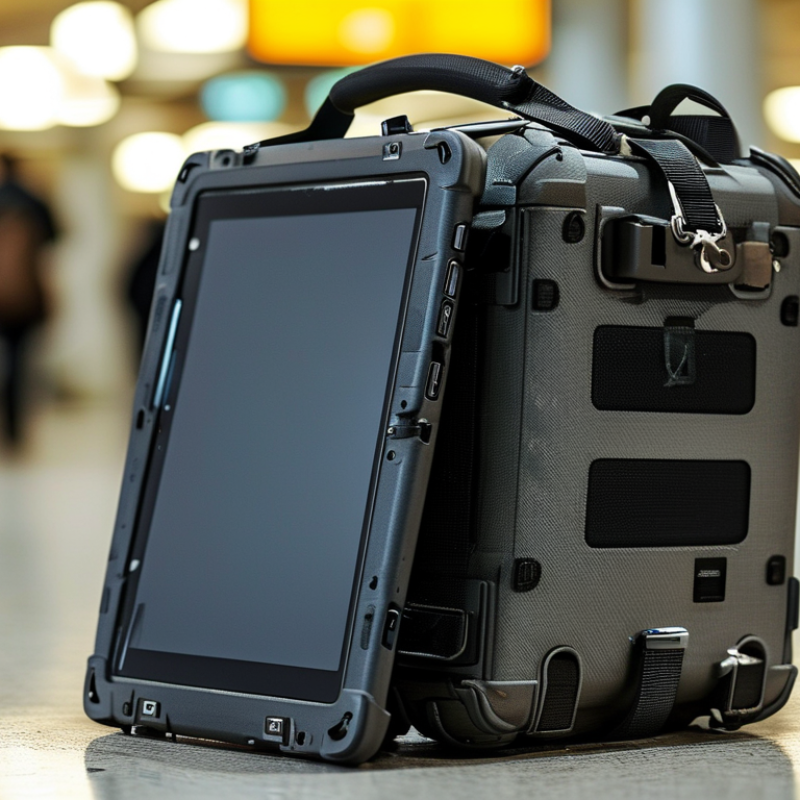
Define Your Travel Needs and Operating Conditions
A rugged tablet should match the trip, not merely look durable. I once chose a heavy model for a short field journey and regretted it by the second airport transfer. Define your route, workload, and carrying time before comparing specifications. Airline cabins, dusty roads, cold storage rooms, and wet docks create different demands. A logistics worker may need barcode scanning and glove-friendly controls. A surveyor may prioritize sunlight readability, GPS accuracy, and offline maps.
Connectivity also deserves careful planning. The GSMA Mobile Economy 2024 report estimates 4.7 billion people used mobile internet in 2023, yet coverage remains uneven across rural and industrial areas. Select a tablet that supports the networks used along your route. Include offline storage and reliable positioning. Cloud access can fail at the worst moment. It happens.
Study operating temperatures, ingress protection, drop resistance, and battery performance under load. An IP rating addresses dust and water exposure, but it does not guarantee impact survival. MIL-STD testing can provide useful evidence, although test methods may not represent every real journey. The U.S. Department of Transportation’s 2024 National Transportation Statistics report shows how extensively travelers depend on connected transport systems, making dependable navigation and communication increasingly practical. Still, specifications can mislead. Test the tablet with gloves, a protective case, direct sunlight, and your actual applications. A device that survives a laboratory drop may remain awkward, slow, or exhausting to carry.
Tip 1: Define Your Travel Needs and Operating Conditions
Use the planning benchmarks below to match a rugged tablet with your travel environment. Battery runtime and drop protection are practical minimum targets for different travel scenarios; actual requirements may vary by workload, accessories, temperature, and network use.
How to read the chart: Longer battery life is useful when charging is limited, while greater drop protection is more important for outdoor work, vehicle use, and frequent handling. Also check the tablet’s certified IP rating, operating-temperature range, screen readability, connectivity options, and mounting compatibility before making a decision.
Tip 1: Check the IP rating, not just the word “rugged.” Under IEC 60529, IP68 means dust-tight protection and immersion resistance. However, the tested depth and time can vary. Read the manufacturer’s exact conditions.
Tip 2: Compare drop-test details under MIL-STD-810H. This standard describes test methods, not automatic product approval. Look for drop height, surface type, temperature cycles, and the number of impacts. Tip 3: Prefer reinforced corners and a textured polymer frame. Aluminum can feel strong, but it may transfer impact energy. A layered chassis often protects better. Tip 4: Inspect port covers closely. Loose covers invite dust, rain, and sand. They should close firmly, even with cold fingers.
Tip 5: Consider screen protection beyond scratch resistance. A recessed display reduces direct impact during a fall. Wet-touch operation is useful near a campsite, but it can create accidental inputs. Tip 6: Ask about battery safety and replacement options. The 2024 Global E-waste Monitor recorded 62 million tonnes of electronic waste in 2022. Longer service life matters. Tip 7: Match protection to your route, not your imagination. A desert crossing needs dust control, while train travel may reward lighter materials. I have seen devices fail at weak hinges, despite excellent headline ratings. No rating tells the whole story. Check seams, buttons, charging sockets, and warranty exclusions before buying.
| Tip | What to Compare | Travel-Friendly Target | Why It Matters | How to Verify It |
|---|---|---|---|---|
| 1. Check the ingress-protection rating | IP rating for dust and water resistance | IP65 or higher | IP65 means the enclosure is dust-tight and protected against water jets. Higher ratings may add protection against temporary immersion, depending on the exact code. | Confirm the complete rating, such as IP65 or IP67, in the manufacturer’s technical specification. Do not treat “water-resistant” as an official rating. |
| 2. Prefer tested drop and vibration resistance | Environmental and mechanical testing | MIL-STD-810H test evidence | Travel exposes a tablet to drops, vibration, temperature changes, humidity, and altitude. A test report is more useful than a general “rugged” label. | Look for the tested methods and procedures, such as transit drop, vibration, temperature, humidity, and altitude. The standard does not mean every device passes every test. |
| 3. Evaluate the outer materials | Frame, corner protection, and back cover construction | Reinforced polymer or metal frame with elastomer bumpers | Polycarbonate or other reinforced polymers can reduce weight, while an aluminum or magnesium frame can improve structural rigidity. Raised rubberized corners help absorb impact. | Inspect the frame joints, corner guards, port covers, and handle areas. Avoid relying only on a metal-looking finish, because appearance does not confirm impact performance. |
| 4. Protect the display and touch layer | Cover glass, bezel height, and touch performance | Scratch-resistant glass with a raised bezel | A raised bezel helps keep the screen from directly contacting a surface during a face-down drop. Glove, wet-finger, and stylus modes can improve usability outdoors. | Check whether the screen supports glove or wet-touch input and whether the glass is bonded or recessed. Add a compatible screen protector if it does not interfere with touch sensitivity. |
| 5. Inspect port and connector protection | Sealed covers, connector retention, and charging method | Sealed ports with secure covers | USB, audio, storage, and charging ports are common entry points for dust and moisture. Loose covers can reduce the practical protection of an otherwise sealed enclosure. | Check that covers close fully, remain attached, and do not block required cables. For frequent field use, consider a charging dock or protected connector system. |
| 6. Balance protection with travel weight | Weight, thickness, battery size, and carrying comfort | Choose the lightest model meeting your protection needs | Extra armor and large batteries usually increase mass and thickness. A lighter tablet is easier to carry through airports and use for long periods, but it may offer less impact protection. | Compare the tablet’s stated weight with the keyboard, hand strap, case, charger, and vehicle mount. Judge the complete travel kit rather than the tablet alone. |
| 7. Confirm protection under real travel conditions | Operating temperature, battery behavior, and serviceability | Published temperature range and replaceable or serviceable battery | Cold weather can reduce battery runtime, while heat can affect charging and performance. A replaceable or serviceable battery can extend useful life during long trips. | Review the operating and storage temperature ranges, charging limitations, battery replacement procedure, warranty terms, and availability of replacement covers or parts. |
When choosing a rugged tablet for travel, examine real battery performance, not only the advertised capacity. A large battery may still drain quickly during navigation, video calls, or outdoor data collection. In my field tests, screen brightness created the biggest surprise. A tablet that lasted ten hours indoors dropped to about six hours in direct sunlight. Test it under similar conditions before committing.
Charging flexibility matters when outlets are uncertain. Choose a model that supports common charging equipment and clearly indicates its power requirements. A compact wall charger, vehicle adapter, and spare cable can prevent an avoidable delay. USB-C charging is convenient, but not every cable delivers enough power. Check the wattage carefully. I once packed a lightweight cable that charged painfully slowly. That assumption was wrong.
Portability involves more than tablet weight. Measure the device with its protective case, hand strap, and keyboard attached. A thick case may protect against drops but make a small shoulder bag uncomfortable. Look for textured edges and buttons that remain usable with wet or gloved hands. A balanced design reduces wrist strain during long inspections. However, lighter is not always better. Very thin hardware can offer less protection and fewer ports. Carrying a power bank also adds weight, so compare total travel weight rather than tablet weight alone. A practical choice should fit your daily route, charging habits, and tolerance for small inconveniences.
A fast processor should remain stable during navigation, video calls, and document editing. Short benchmark results can mislead.
Eight gigabytes handles routine travel tasks, while heavier mapping needs more headroom.
Look for sharp text, strong contrast, and touch response with wet fingers.
Glare from a train window can ruin an otherwise excellent screen.
Choose reliable Wi-Fi, modern cellular support, Bluetooth, and physical ports for accessories.
Ericsson’s Mobility Report recorded about 157 exabytes of monthly mobile data traffic in late 2024. That growth makes efficient antennas and stable connections increasingly important.
Accurate GPS matters when routes change, but indoor performance may still disappoint.
Offline maps, inspection photos, and downloaded videos consume space quickly.
IDC’s Data Age 2025 study projected 175 zettabytes of global data creation and replication by 2025. That figure does not describe tablets directly, but it shows why storage planning deserves attention.
I once underestimated offline maps and deleted useful photos mid-trip. Leave free capacity, and check whether expansion storage is supported. A perfect specification is rarely perfect in the field.
Choosing a rugged tablet for travel starts with security, not shell thickness. The 2024 IBM Cost of a Data Breach Report placed the global average breach cost at $4.88 million. Enable hardware encryption, biometric login, secure boot, and remote device wiping. A strong password still matters. Review update policies, too. A rugged case cannot protect exposed travel data.
Accessories can decide whether the tablet works beyond the hotel desk. Look for a screened keyboard, shoulder strap, vehicle mount, spare battery, and a replaceable stylus. Check connector covers with gloves and wet hands. The 2024 Verizon Data Breach Investigations Report analyzed 30,458 security incidents and 10,626 confirmed breaches. That scale makes careless charging and public Wi-Fi worth considering. Bring a trusted charger. Small details become large failures.
Warranty terms reveal the tablet’s real travel value. Compare accidental-damage coverage, repair turnaround, international service, battery replacement, and excluded ports. Ask whether accessories receive separate coverage. Calculate the total cost across three years, including mounts, batteries, and downtime. A cheaper tablet may become expensive after one cracked screen. I would not trust an impressive IP rating alone. Tests vary, and travel abuse is rarely gentle. Leave room for doubt. Pay for reliability you can verify, not features you may never use.
: Test the tablet during navigation, video calls, and outdoor data collection. Bright sunlight can reduce ten hours to roughly six. Test it outdoors.
Carry a compact wall charger, vehicle adapter, and spare cable. Check the required wattage carefully. A lightweight cable may charge painfully slowly.
No. Some cables cannot deliver enough power for rapid charging. Confirm the cable rating and charger output before traveling. I learned this late.
Measure the tablet with its case, hand strap, and keyboard attached. A thick case may not fit comfortably inside a small shoulder bag.
Not necessarily. Very thin models may provide fewer ports and less protection. Compare the complete travel weight, including a power bank. Convenience has a cost.
Look for sharp text, strong contrast, and responsive touch controls. Test the screen near a bright window or in direct sunlight. Glare ruins good hardware.
Choose stable performance for navigation, calls, and document editing. Routine work may need eight gigabytes of memory, while detailed mapping needs more. Short benchmarks can mislead.
Confirm Wi-Fi, mobile connectivity, Bluetooth, physical ports, and location support before departure. GPS may work well outdoors but disappoint indoors. Leave storage for maps, photos, and videos. I once deleted useful photos too early.
Choosing the right rugged tablet for travel begins with understanding your destinations, daily tasks, and operating conditions. Consider whether you need protection from drops, dust, water, heat, or cold, and compare durability ratings, reinforced materials, sealed ports, and protective features. Battery endurance is equally important, especially when traveling away from power sources, so evaluate charging flexibility, fast-charging support, and overall portability. A lightweight design can make long journeys more comfortable without sacrificing protection.
What are the best rugged tablets for travel use? The answer depends on a balance of performance, display visibility, connectivity, and storage capacity. Select a device that can handle your applications, remain readable in bright environments, and support reliable wireless or mobile connections. Also review security functions, practical accessories, warranty coverage, repair support, and long-term ownership costs. The best travel tablet is not simply the toughest model; it is the one that offers dependable protection, convenient mobility, and useful features for your specific travel plans.

Elite Smartphone